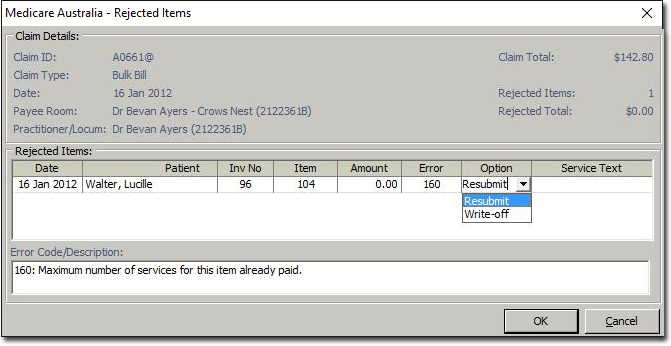
The Medicare Online Claim Rejected Items window is used to locate and process rejected claims. These claims may be resubmitted to Medicare or written off.
|
Claim ID |
Displays the Claim ID. |
|
Claim Type |
Displays the Claim Type. |
|
Claim Date |
Displays the date of the claim. |
|
Payee Room |
Displays the Practitioner and the room location. |
|
Practitioner/Locum |
Displays the name of the Practitioner or Locum and the Provider number. |
|
Claim Total |
Displays the claim total. |
|
Rejected Items |
Displays the number of rejected items. |
|
Rejected Total |
Displays the total amount of the rejected items. |
|
Date |
Displays the date the service was performed. |
|
Patient |
Displays the patient name. |
|
Inv No |
Displays the invoice number. |
|
Item |
Displays the service item code. |
|
Amount |
Displays the amount of the service item. |
|
Error Code |
Displays the error code number. |
|
Option |
Allows you to resubmit or write off the rejected claim. A Write-off receipt is created for the amount of the original invoice item, and allocations made to this item. Resubmit - A Write-off receipt is created as above and a new invoice created containing an item which is a copy of the original rejected item. This new invoice can then be resubmitted by attaching it to a new claim. |
|
Service Text |
Allows you to enter service text for this claim. |
|
Error Code/Description |
Displays the description of the error code. |
|
OK. |
Allows you to save the details. |
|
|
Allows you to cancel the window. |

Notes on Rejected Items
Each rejected item must be either written-off or resubmitted.
Partial write-offs are not permitted.
All items are processed at the same time.