Configuring the MIR Device and / or winspiroPro
When using winspiroPro in conjunction with Clinical, you do not need to configure the software and/or the device; you need only install the winspiroPro software on the same computer on which Clinical resides to begin using it.
Performing a Test in Clinical
Select
Tools > Tool
Box > Respiratory Function
from the patient's Clinical window. The Respiratory
tab appears.
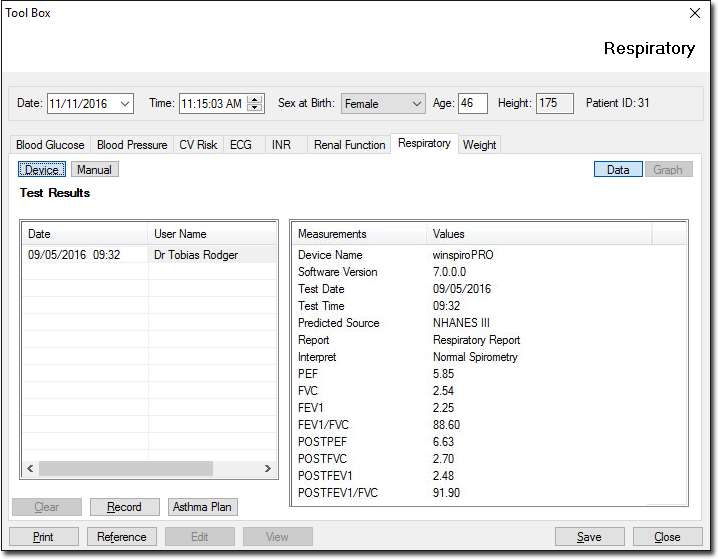
Click
 to
use the winspiroPro device to record values.
to
use the winspiroPro device to record values.
Click
 The
Available Spirometer Machines window is displayed if more than
one device is installed. Select the device you wish to use from
this window.
The
Available Spirometer Machines window is displayed if more than
one device is installed. Select the device you wish to use from
this window.
Once the test has been successfully performed, exit the spirometery application. You will be returned to Clinical.
Using the Graph View
Click
 to display the patient's record in graph format. Use the scroll bar to
view different sections of the graph.
to display the patient's record in graph format. Use the scroll bar to
view different sections of the graph.
Click
 to print the sections of the graph displayed on the screen.
Click
 to close the Graph window and return to patient's Clinical window.